

How to Organize Digital Photos
(and Clear the Energy They Hold)

Do you ever feel overwhelmed by how many photos live on your phone, laptop, and cloud? We take pictures of everything these days: meals, sunsets, kiddos, pets, and everyday moments we don’t want to forget. But when everything’s mixed together without order, it becomes more frustrating than fulfilling. Out of sight often becomes out of mind, and before long, our digital photo collection starts to overwhelm and feel like clutter.
Just like your physical home, your digital space deserves attention and care. The good news? You can take control and it doesn’t have to feel stressful. Organizing your photos can actually become a mindful ritual that clears emotional space and reconnects you to the joy behind each image.
Here’s a Soulstice Living–inspired process to help you organize your digital photos with ease, intention, and energetic clarity.
Step 1: Know Your Reason for Organizing Digital Photos
As with anything, it helps to know your reason for getting your digital photos organized.
Do you want to easily find pictures of your loved ones?
Do you want to create to create digital albums, scrapbooks, or prints?
Do you want to reduce the overwhelming feeling of thousands of unnamed files?
- Or simply to feel a sense of calm and control around your photos?
Intention matters. Your reason will guide you when the process feels tedious. This isn’t just about files. It’s about reclaiming your energy and sense of peace.
Step 2: Gather All Your Digital Photos in One Place
 Take Stock of EVERYTHING
When I help clients organize physical spaces, we start by pulling everything out. The same applies here. Gather all your photos into one digital “pile” and include:
Your phone’s camera roll
Laptops or desktops
Cloud storage (Google Photos, iCloud, Amazon Photos, OneDrive)
External hard drives or memory cards
Cameras and other devices
Upload everything into one folder on the computer you’ll use. The goal is simple: one central home base for your memories.
And if your photos already live mostly in a cloud app, that’s great and convenient. You can organize right within the platform.
Step 3: Choose a Home for Your Memories
Select where your photos will live long-term. Consider this your sacred container: a digital sanctuary that protects your memories and clears energetic clutter from your phone and mind.
Cloud systems like Google Photos, iCloud, or Amazon Photos automatically back up, date, and categorize your images, ensuring nothing is lost.
Step 4: Create a Folder System That Feels Natural
There’s no one “right” way to organize. Choose what makes sense for you:
Option 1 – Chronological:
Organize by year, then event or holiday.
Example: 2025 → Summer → Family Vacation
Option 2 – Category-Based:
Sort by type, then date.
Example: Travel → 2023 Italy Trip or Family → Holidays
Or get creative and label albums in ways that spark emotion: Moments of Joy, Growth, Adventures with Love. The words you use carry energy.
Pro tip: don’t overthink the labels. Your system should feel intuitive, not rigid. Simple, not overly complicated.
Chronological Photo Folders
For some people, chronology makes the most sense. This requires a folder for each year and then subfolders for holidays, events, etc. within each year. Here’s an example to show you what this system might look like:
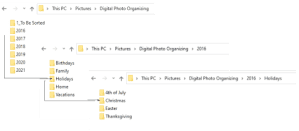
Category Photo Folders
Another option is to sort by category first, and then the year within that category. This system is good for people who have a hard time remembering what year a certain event occurred, but they know where or what event it’s from:

Once you’ve chosen the structure, set up empty folders ahead of time so you have places to sort your photos in the next step.
Step 5: Sort & Declutter with Intention
Now comes the mindful work. This step will take you the longest as you go through each photo and decide what stays and what goes. Delete duplicates, blurry shots, and screenshots that don’t serve a purpose.
 As you sort, notice what emotions surface. Some photos will spark joy; others might feel heavy or outdated. It’s okay to release what no longer aligns with who you are today.
If you have thousands of photos, break the process into smaller chunks. Do one month or one folder at a time. Reward yourself for progress, like watching your favorite show while sorting or treating yourself to something relaxing afterward.
You can even bring intention into it. Light a candle, make tea, or play calming music while you sort and delete. Reflect on what these photos represent: a season of growth, a new beginning, a moment of joy. When you bring mindfulness to digital organizing, it transforms from a task into a form of energetic clearing.
Cloud Apps
If you are organizing your photos in a Cloud App, deleting and finding just became so much easier and faster. You can search by face recognition, date, a location and most times an object.
iCloud / Apple
- Search & Sort
Use the Search bar to find photos by date, location, object, or person.
Tap Albums → People & Pets to view automatically recognized faces.
Select a person → tap Select → Show in All Photos to delete or group photos (e.g., removing an ex or creating a photo book to celebrate a milestone birthday).
2. Create Albums & Folders
Tap Albums → + → New Album to group by trip, event, or person.
Use Smart Albums (Mac only) to auto-organize by criteria like “Date Taken” or “Camera Type.”
3. Memories & Photo Books
Apple Photos auto-creates Memories by event or date: you can edit or duplicate to personalize.
To make a photo book, use File → Create → Book (on Mac) or export to third-party apps like Shutterfly.
Google Photos
1. Search & Filter
Use Search → People, Pets, Places, or Things (AI-based recognition).
Search a name or keyword (e.g., “Hawaii 2022”) to locate photos for specific trips.
To remove photos of someone: tap their face group → Select All → Delete.
2. Organize with Albums
Tap Library → New Album → Add Photos by date, location, or theme (e.g., “50th Birthday Book”).
Use Favorites for quick collections.
3. Create Projects
Tap Print store → Photo Books to design and order printed books directly in Google Photos.
Use Shared Albums to collaborate or collect images from multiple people.
Step 6: Create a Simple System for Future Photos
The key to staying organized is consistency. Once you’ve decluttered, build an easy rhythm for the future. Here are a few Soulstice-styled suggestions:
• Weekly mini cleanse: each Sunday, delete unwanted photos, memes, and screenshots from the week.
• Monthly sync: on the first of each month, upload or review all new photos and place them in your “to sort” folder or shared family album. Then assign to a specific folder.
• In-app organization: both Apple and Google Photos let you create albums right on your phone, so no downloads required. Also easy to share with others!
Remember, consistency is the key to photo peace.
If you’re more visual, create a recurring “New Moon Photo Cleanse” ritual and declutter your digital space while setting intentions for the month ahead.
Step 7: Back Up Your Photos (and Protect the Energy They Hold)
 Once organized, it’s time to back everything up in at least two (ideally three) places:
- Your computer or external hard drive
- A reliable cloud system like iCloud, Google Photos, or Amazon Photos
- (Optional) Physical prints or an annual photo book for tangible memories
Think of backups as your safety net, an energetic insurance policy against loss. And keep telling yourself that this redundancy ensures your memories stay protected no matter what happens.
Modern photo apps now make backups easier than ever. Google Photos and Apple Photos allow you to create albums directly in the app, meaning you don’t need to move everything to a computer if that feels overwhelming.
Step 8: Celebrate and Reconnect with Your Memories
 Once your collection is organized, do something beautiful with it. Print your favorites. Create a digital slideshow that plays in your living room. Design an annual “Year in Photos” book or share a “Gratitude Gallery” online.
Your photos deserve to be enjoyed, not hidden in endless scrolls of chaos.
The Result: Peace of Mind, Energy Flow, and Presence
 Organizing your digital photos is more than a productivity task, it’s energetic maintenance. Each deleted duplicate and labeled folder frees up mental and emotional space.
When you open your photo gallery and see order instead of overwhelm, you’ll feel the difference. It’s calm. It’s clarity. It’s alignment.
So, the next time you scroll through your memories, let it be with gratitude, not guilt.
Every photo tells a story but not every story needs to be carried forever. Curate the ones that fill your heart, back them up with care, and let your digital space reflect the same serenity you’re creating in your home and soul.
Happy photo organizing, beautiful soul!
Stephanie
If you want to explore the transformative power of daily quiet time, listen to Podcast: ‘Q’ is for Daily Quiet Time
Discover more from Soulstice Living
Subscribe to get the latest posts sent to your email.






Interesting! Was thinking last night about my husband’s video preferences and how the mere sound of violent words will put “bad energy” into the house. This is a similar concept that I hadn’t considered. Thanks.
Hi Christina! You’re welcome! Have fun deleting the photos you no longer want in your life. 🙂